

04 / 04
Keepr
A full-stack digital archive built with React, Flask, PostgreSQL, and Expo. It is designed for saving links found on the web, organising them into categories, bringing them back through reminders, and keeping them reachable across devices.
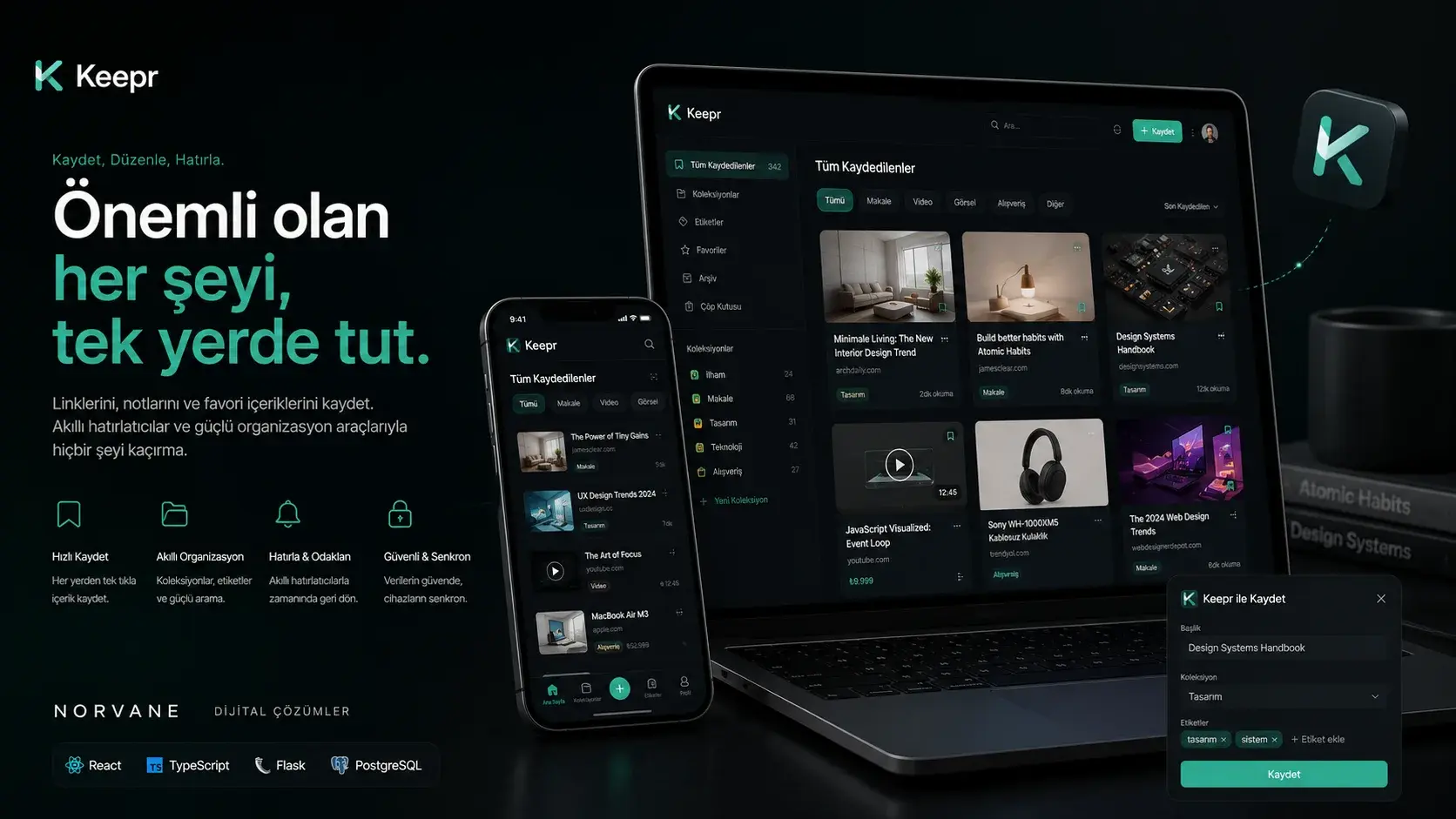
Project snapshot
- Status
- Completed
- Role
- Product design, full-stack development, mobile experience, API, and data architecture
- Technologies
- React · Flask · PostgreSQL · Expo
Overview
Turning saved links from a passive list into an actionable digital memory.
- Context
- Keepr is a full-stack personal knowledge space that brings digital links saved for later reading, viewing, shopping, or reference into one structured workspace. The web interface supports link creation, categories, search, filtering, sorting, favourites, pinning, and bulk actions. The Expo-based mobile application shortens the capture flow by receiving links directly from the device's native share menu.
- Goal
- To treat storage as only the first step: making saved content genuinely reusable later through reminders, shared collections, nested folders, and keyboard actions.
- Norvane’s role
- Product design, full-stack development, mobile experience, API, and data architecture
The Need
People tend to scatter the content they care about across open tabs, messaging apps, notes, and browser bookmarks.
Those habits store the content but guarantee nothing about finding it again, classifying it, or being reminded of it at the right moment. When a link is kept as nothing but a URL, the context that made it worth keeping disappears with it.
The central product problem in Keepr was to keep the act of saving as short as possible while keeping a growing archive readable, searchable, and actionable.
- Scattered places to saveReducing the number of links that disappear into separate apps and open tabs.
- Weak retrievalMaking saved content reachable again through categories, search, and sorting.
- Forgotten contentBringing links back into view at the right time through reminders.
- Friction between devicesCutting the steps needed to move a link seen on a phone into the archive.
- Growing collectionsKeeping large archives manageable through folders, nesting, sharing, and bulk actions.
Approach
Keepr has three layers: a React and TypeScript web interface, an Expo React Native mobile application, and a Flask REST API. Both clients run against the same API and the same data layer; what differs between them is how a link is captured.
Package access is not enforced by hiding features in the interface alone — the same limits are checked server-side, which keeps a request that bypasses the UI from bypassing the package boundary with it.
On the design side the system is built around light and dark themes, neutral surfaces, restrained corner radii, and a controlled indigo accent. The accent is reserved for primary actions, active states, and focus feedback, while motion is used to explain a change of state rather than to keep the application permanently animated.
Capture time first
The save flow can finish without forcing the user to classify anything; organising can come later.
Saving stays user-confirmed
A link detected in the clipboard is offered as a suggestion; nothing is written to the archive without confirmation.
Limits live on the server
Package-gated operations are not merely hidden in the UI; they are checked again at the API layer.
A bounded hierarchy
Folder depth is capped at two levels, and circular references are rejected by backend validation.
State is never colour alone
Shared folders and read-only roles are distinguished by labels and badges, not hue.
Clients and API
- React and TypeScript web interface
- Expo React Native mobile application
- Flask REST API over Bearer JWT
- User, link, category, sharing, and reminder operations
- PostgreSQL relational data layer
Link flow
- Web add field or mobile share menu
- URL format validation on the API side
- Title detection from the target page's metadata
- Record creation with an optional category
- Entry into search, favourite, pin, reminder, and sharing flows
Design tokens
- Accent — indigo#4F46E5
- Accent — interaction#4338CA
- Warning and delete#EF4444
- Light theme — background#F8F9FA
- Light theme — primary text#1A1A1A
- Dark theme — background#0A0A0A
- Dark theme — surface#121212
- Dark theme — primary text#F5F5F7
Features
Turning a URL into an editable record
When a user adds a link, the system validates the URL format and attempts to detect the record's title from the target page's metadata. The title is read from Open Graph, Twitter Card, or HTML title fields.
The link can be assigned to a category, and its title and description can be edited by hand. Once created, the record enters the search, favourite, pin, and reminder workflows.
- URL format validation
- Title detection from metadata
- Editable title and description
- Optional category assignment
Turning a copied link into an intentional save
When the user returns to the Keepr tab, clipboard content can be inspected where browser permission allows. If a valid web address is found, a quick-save surface appears at the bottom of the screen.
Nothing is stored without confirmation: detection only produces the suggestion, and the save action stays with the user. Because clipboard access depends on browser permissions, this flow is not guaranteed in every environment.
- Runs only where permission exists
- No automatic saving
- Quick capture on web and mobile
Balancing quick scanning with detailed inspection
Link cards present title, source, category, and record state in a dense but quiet layout. Selecting a record opens the inspector panel, where link details and the available actions get a wider surface.
From that panel a link can be opened, edited, moved between categories, favourited, pinned, given a reminder, or deleted. Some of those actions depend on package access.
- Card and list layouts
- Link actions on one surface
- Package-aware actions
Scanning a growing archive through search and a bounded hierarchy
Keepr searches across link titles, descriptions, and URLs. Records can be filtered by category or through the favourites view and sorted by newest, oldest, or alphabetically, with pinned links taking priority in the default order. The search field is focused with Command + K or Control + K.
Links are organised under root categories and nested folders. The hierarchy is capped at two levels, and backend validation rejects circular references and unsupported depth. When a category is deleted, its links can move to the uncategorised area instead of being removed with the folder.
- Search across title, description, and URL
- Newest, oldest, and alphabetical sorting
- A two-level nesting limit
- Links survive folder deletion
Acting on a collection and moving faster from the keyboard
Selection mode supports moving, deleting, favouriting, or pinning several links in one pass. Editing bulk actions are disabled in shared collections where the current user only holds read-only access.
Repetitive archive work can be driven from the keyboard: F toggles favourite, P toggles pinned, A opens the reminder panel, Delete or Backspace removes the link, and Escape closes the open panel.
- F — favourite, P — pin, A — reminder
- Delete or Backspace — remove
- Disabled in read-only collections
Bringing a saved link back at the right time
Pro and Team users can attach a date and time to a link. A scheduled task on the backend checks for due records at intervals and, where email configuration is available, sends a reminder containing the link's title and address.
When no email service is configured, the current development behaviour falls back to application logs. Favourites and pinning serve the standing version of the same need: they keep important records near the surface of the archive, and pinned links lead the default ordering.
- Date and time based reminders
- Scheduled backend checks
- Log fallback without email configuration
- Favourites and pinning — Pro and Team
From a private archive to controlled sharing and shared folders
Team users can expose a root category as a shareable collection. The shared page presents the root category's links together with the contents of its nested folders in a responsive layout, while links marked private stay out of that output. The result is a read-only presentation surface for visitors holding the link.
The same structure opens up to collaboration: an invitation is created at category level, and the invited user joins as either viewer or editor. Viewers only read; editors can add and modify links. The interface separates shared folders and read-only states through visible labels.
- Sharing at root-category level
- Private links excluded from output
- Viewer and editor roles
- Shared folders — Team
Reaching the same archive through different capture patterns
The web application provides the wider workspace for organising, searching, and managing larger collections.
The Expo-based mobile application focuses on quick capture and use on the move: selecting Keepr from the operating system's share menu hands the shared URL to the app, where it is saved after choosing a category. Both clients run against the same API and the same data layer.
- Web — organising and bulk management
- Mobile — capture from the share menu
- One API, one data layer
Managing email verification with short-lived codes and token sessions
Registration collects username, email, password, and the required consent information, and an unverified account cannot enter the normal session flow. The six-digit OTP is not stored as plain text: an HMAC-SHA256 digest is kept instead, and the submitted value is checked with a timing-safe comparison.
Once verification succeeds, the application issues a short-lived access token of roughly fifteen minutes alongside a cryptographically generated refresh token tracked in the database. Using a refresh token revokes the old record and issues a new one; if a revoked token is presented again, the related sessions can be closed.
Failed sign-in attempts are recorded against IP and email, and temporary blocks can follow once a threshold is passed. Password updates are checked against password history, and registration, sign-in, sign-out, password changes, and bulk link operations are traceable through the audit log.
- OTP is never stored in plain text
- Short access token, tracked refresh token
- Attempt tracking and temporary blocks
- Password history and audit log
Modelling feature access across Free, Pro, and Team
The Free tier covers saving links, using categories, search, and editing. Pro opens up theme and accent selection, favourites, pinning, and reminders. Team adds nested folders, shared folders, and collection sharing on top of Pro.
The backend does not rely on hiding features in the interface: package-gated API operations are checked server-side as well. Within the current scope of the project, upgrading is simulated through a test mock endpoint — there is no real payment or subscription billing.
- Server-side package checks
- Upgrades run through a test mock endpoint
- No real payment infrastructure
Technical Build
A monorepo connecting web and mobile clients to one API and data layer. The clients talk to the Flask API over Bearer JWT, while PostgreSQL provides the relational layer for users, categories, links, tokens, and audit records.
- Web interface
- React 19 · TypeScript · Vite · Tailwind CSS · TanStack Query · Framer Motion · Lucide React
- Mobile
- Expo · React Native · expo-share-intent · lucide-react-native
- Application layer
- Flask · Flask-SQLAlchemy · Flask-Migrate · PyJWT · BeautifulSoup · cloudscraper
- Data
- PostgreSQL
Outcome
Keepr brings link capture, organisation, search, quick actions, reminders, and sharing together across web and mobile within one product architecture.
The project reaches past a visual bookmark interface: authentication, token sessions, package access, a relational data model, shared-folder permissions, scheduled tasks, and cross-platform capture flows are treated as connected parts of the same product.
Current scope and next areas of development
- There is no real payment or subscription billing; upgrading runs through a test mock endpoint.
- Unless SMTP configuration is verified in production, OTP and reminder email delivery is not offered as an active service.
- Metadata extraction is limited to the link title; description and image extraction are not presented as verified features.
- Reading-time estimation is unverified and cannot be produced reliably without sufficient content data.
- Offline use and synchronisation remain on the roadmap.
- Detailed usage analytics remains on the roadmap.
- App Store and Google Play releases are unverified.
- The mobile share flow needs separate verification on a real device and build.
- Shared collections provide read-only presentation; there is no password protection or access analytics.
- The product has not been through an independent security review.
Related insights
- How Should Technology Be Chosen for a New Digital Product?Requirements and team capability decide this, not trends. Recording why you chose matters as much as what you chose.
- When Is the Right Time to Build a Design System?Not every product needs one. Built too early, a design system costs more than the problem it was meant to solve.
- Why a Beautiful Product Interface Can Still Be Hard to UseVisual quality doesn't guarantee usability. Information architecture, unclear actions, and cognitive load break it quietly.

Working on a similar digital product?
Share the need, the current situation, and your goals so we can evaluate the right starting point together.